System Administration
Linux Filesystem
The goal of this chapter is to get to know the Linux File System. The most important files and directories and the conventions around them.
Storage in Linux
In Linux, storage is managed through a hierarchical structure consisting of three main components: partitions, volume management, and file systems. Partitions divide storage devices into separate sections, managed by tools like fdisk or parted. Volume management, facilitated by tools like LVM (Logical Volume Manager), enables flexible allocation and resizing of storage volumes. File systems, such as ext4 or XFS, are then applied to partitions or logical volumes, providing the structure for data storage and retrieval. This layered approach allows for efficient organization, expansion, and utilization of storage resources in Linux systems.
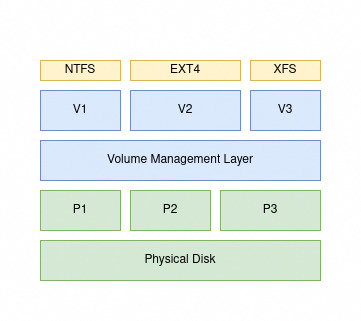
Here are some Linux utilities to manage storage in Linux systems:
lsblk: list block devices(disks).*fdisk,*parted: Partition linux disks.mkfs.*: Format a partition in a specific FS.mount/umount: mount and umount a filesystem.lvm: Volume management.
The linux Filesystem
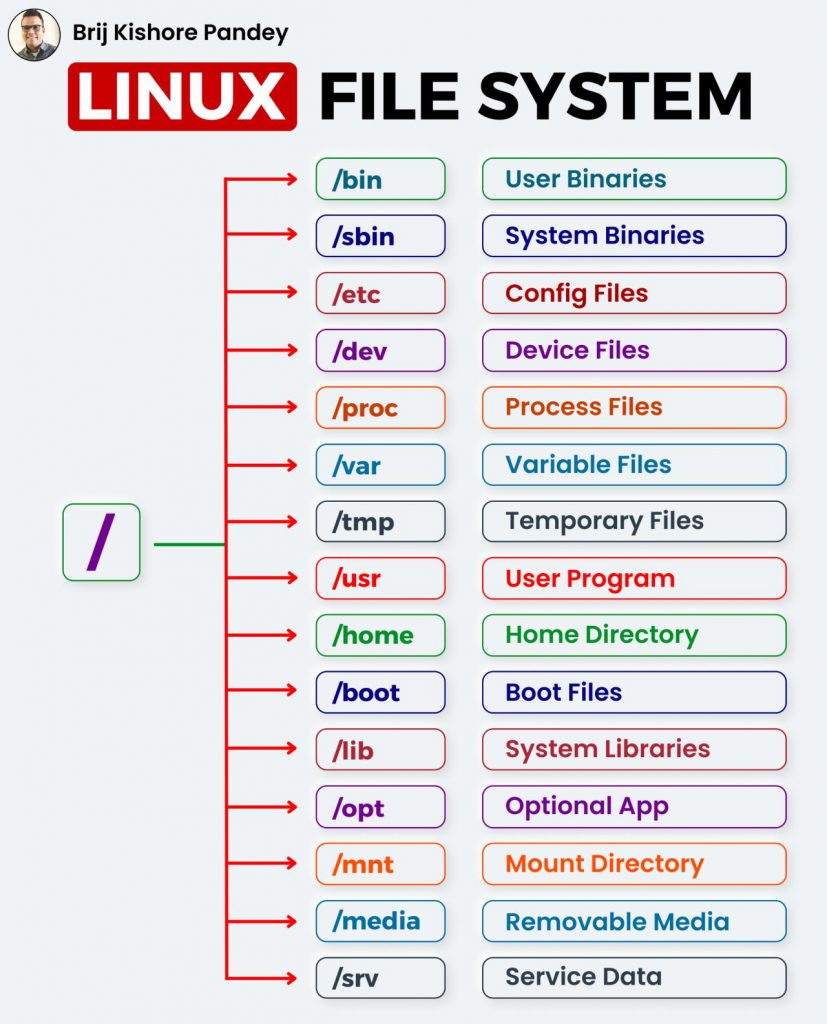
The Linux file system is a hierarchical structure that organizes and manages data on storage devices. Rooted at “/”, it encompasses directories, subdirectories, and files. Each file and directory is represented by an inode, containing metadata like permissions and timestamps.
Assignment
- Create a directory your site name in
/var/wwwand change its owner to the current user. What is/varfor ? - Create an html file
index.htmland put something in it. - Navigate to
sites-availabledirectory under the apache2 configuration directory. - Create a new file in the
sites-availabledirectory. Name it<your-site-name>.conf
<VirtualHost *:80>
    ServerName your_site_name
    ServerAlias www.your_site_name
    ServerAdmin webmaster@localhost
    DocumentRoot /var/www/your_site_name # Should match the previously created folder.
    ErrorLog ${APACHE_LOG_DIR}/error.log
    CustomLog ${APACHE_LOG_DIR}/access.log combined
</VirtualHost>
- Enable your site and disable the default one.
sudo a2ensite <your_site_name>
sudo a2dissite 000-default
- Reload apache2 configuration using
systemctl