System Administration
Linux Package Management
Package management is one of the most important aspects of Linux Administration. Most Package managers follow the same logic, still they differ in the implementation.
1. Linux Distributions and Package Management
- RPM based distros: RHEL, Oracle Linux, Suse, Fedora, CentoOS …
- Debian based distros: Debian, Ubuntu, Mint, Kali …
- Pacman based distros: Arch, Manjaro, Parabola …
- Portage based: Gentoo, CoreOS Container Linux, ChromeOS …
- More
2. How Package Managers Work (APT usecase)
APT, or Advanced Package Tool, is a package management system used in Debian-based Linux distributions. It collaborates with the lower-level dpkg package manager to handle the installation, removal, and upgrading of software. APT simplifies these processes by automating dependency resolution and managing repositories, such as PPAs, providing users with an efficient way to manage software on their systems.
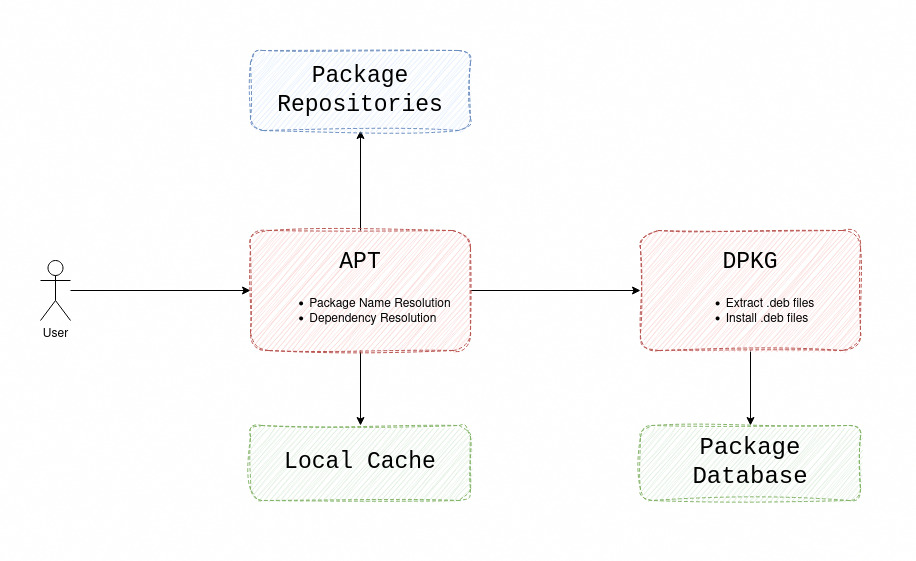
2.1 Important files and directories
/etc/apt/apt.conf: APT configuration file./etc/apt/sources.list: Locations to fetch packages from./var/cache/apt/archives/: Storage area for retrieved package files./var/lib/apt/lists/: Storage area for state information for each package resource specified insources.list/var/cache/apt/*.bin: caches information about available packages and their dependencies./var/lib/dpkg/: dpkg package database files.
3. Package Managers Basic Operations
Most package managers offer the same command interface. The 3 main operations are installation, uninstallation and cache update:
| Package Manager | install | uninstall | update cache | search repositories | query database |
|---|---|---|---|---|---|
| apt | install | remove | update | search | show |
| yum | install | remove | update | search | info |
| pacman | -S | -R | -Sy | -Ss | -Q |
4. Assignment: Install LAMP Stack
Our first task will be as easy as installing the LAMP stack (Apache web server, Mysql, PHP).
Solution: Install LAMP Stack
First let’s install Apache Web Server
# In debian/ubuntu based distributions
sudo apt update
sudo apt install apache2
Then let’s install and configure Mysql Server
sudo apt install mysql-server
Install php, and libraries for Apache and Mysql Connection.
sudo apt install php libapache2-mod-php php-mysql
5. Openings
- rpm based package managers (rpm, yum, dnf).
- Native Package managers limitations
- Universal package managers (snap, appimage, flatpak …) link